Parallel container builds with Jenkins scripted pipeline
Created a new pipeline for building my container images in the homelab. A dynamic choice populates a “matrix” that runs container build stages in parallel on runners with different architectures.
I was writing about how and why I use Jenkins last year.
The basic idea behind the pipeline here is to build container images for multiple platforms/architectures (arm64 & amd64 mainly).
An advantage of using the runners native architecture (arm64/amd64) for the builds is that I don't need to use the QEMU emulation with buildah.
Jenkinsfile with static nodes/stages
My previous Jenkinsfile (starting point) was very “static”. Static in a way, that the nodes were selected sequentially (first build on an arm64 node, then on a amd64 node) and I created two different tags for the different architectures:
@Library('in0rdr-jenkins-lib@master') _

def buildahbud = new BuildahBud(this)
def buildahpush = new BuildahPush(this)
def buildahmanifest = new BuildahManifest(this)

node('podman&&arm64'){
  checkout scm

  // build with image context and name
  buildahbud.execute([:], "docker/docker-snac", "snac", "2.90-arm64"
    'Dockerfile', 'arm64/v8')
  buildahpush.execute("snac", "2.90-arm64")
}

node('podman&&amd64'){
  checkout scm
  buildahbud.execute([:], "docker/docker-snac", "snac", "2.90-amd64",
    'Dockerfile', 'amd64')
  buildahmanifest.create('haproxy.lan:5000/snac:2.90', [
    'haproxy.lan:5000/snac:2.90-arm64',
    'haproxy.lan:5000/snac:2.90-amd64'
  ])
}
You can find my Jenkins libraries here: * https://code.in0rdr.ch/jenkins-lib/files.html
Pulling a different tag depending on the architecture is cumbersome. By creating a Manifest (buildah manifest create) I can reuse the same tag across multiple machine architectures (e.g., I can use haproxy.lan:5000/snac:2.90 on amd and arm machines):
buildah manifest inspect haproxy.lan:5000/snac:2.90
{
    "schemaVersion": 2,
    "mediaType": "application/vnd.oci.image.index.v1+json",
    "manifests": [
        {
            "mediaType": "application/vnd.oci.image.manifest.v1+json",
            "digest": "sha256:7f67daa2193f2ef9a84c3bcaa14c73d429165631cbbc6c30faf74ef69ac07d4a",
            "size": 1207,
            "platform": {
                "architecture": "arm64",
                "os": "linux",
                "variant": "v8"
            }
        },
        {
            "mediaType": "application/vnd.oci.image.manifest.v1+json",
            "digest": "sha256:85b79a9014eed10f8b12cddd9f6fcf9a0e56cdf792b96cf4cde52c9c8f61c4f7",
            "size": 1204,
            "platform": {
                "architecture": "amd64",
                "os": "linux"
            }
        }
    ]
}
Dynamic choice, run stages on nodes in parallel
I decided to change my static Jenkinsfile and spice it up with the dynamic choices based on the “input matrix”. The “platform” axis only holds the “podman” platform right now. * https://code.in0rdr.ch/jenkins-lib/file/src/BuildahParallelBuild.groovy.html
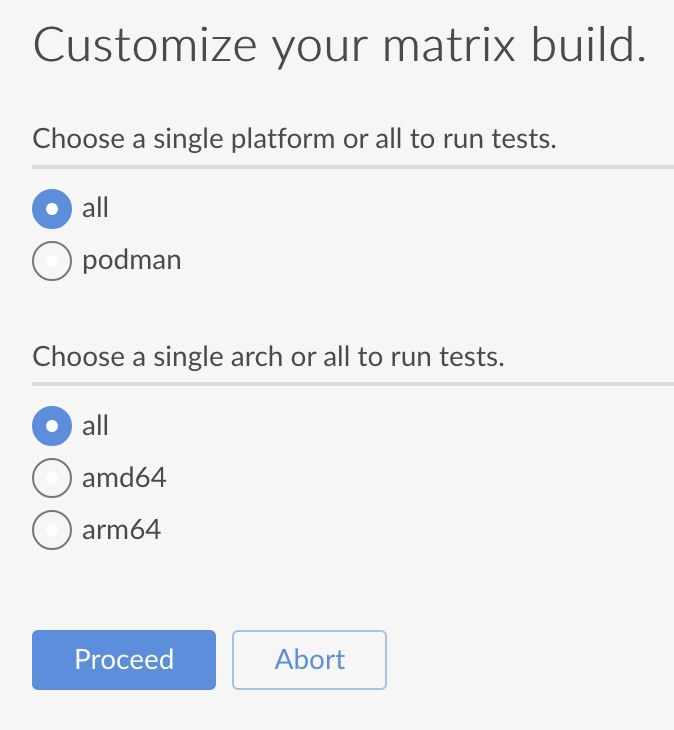
For this, I took some inspiration from an older Jenkins blog post from 2019. The code example for a scripted pipeline with “dynamic choices” (choices based on predefined matrix axes) still works pretty fine.
My inputs can now be kept rather simple, they simply describe which Dockerfile I want to build, from which path in the repo, with certain name & tag (optionally some build arguments):
@Library('in0rdr-jenkins-lib@master') _

def buildahParallelBuild = new BuildahParallelBuild(this)

buildahParallelBuild.build("snac", "2.90", "docker/docker-snac")

// Other example inputs:
//buildahParallelBuild.build("texlive", "latest", "docker/docker-texlive")
//buildahParallelBuild.build("updatecli", "v0.114.0", "docker/docker-updatecli")
//buildahParallelBuild.build("jenkins-inbound-agent", "3355.v388858a_47b_33", "docker/docker-jenkins-inbound-agent", [arg1: "test", arg2: "test2"])
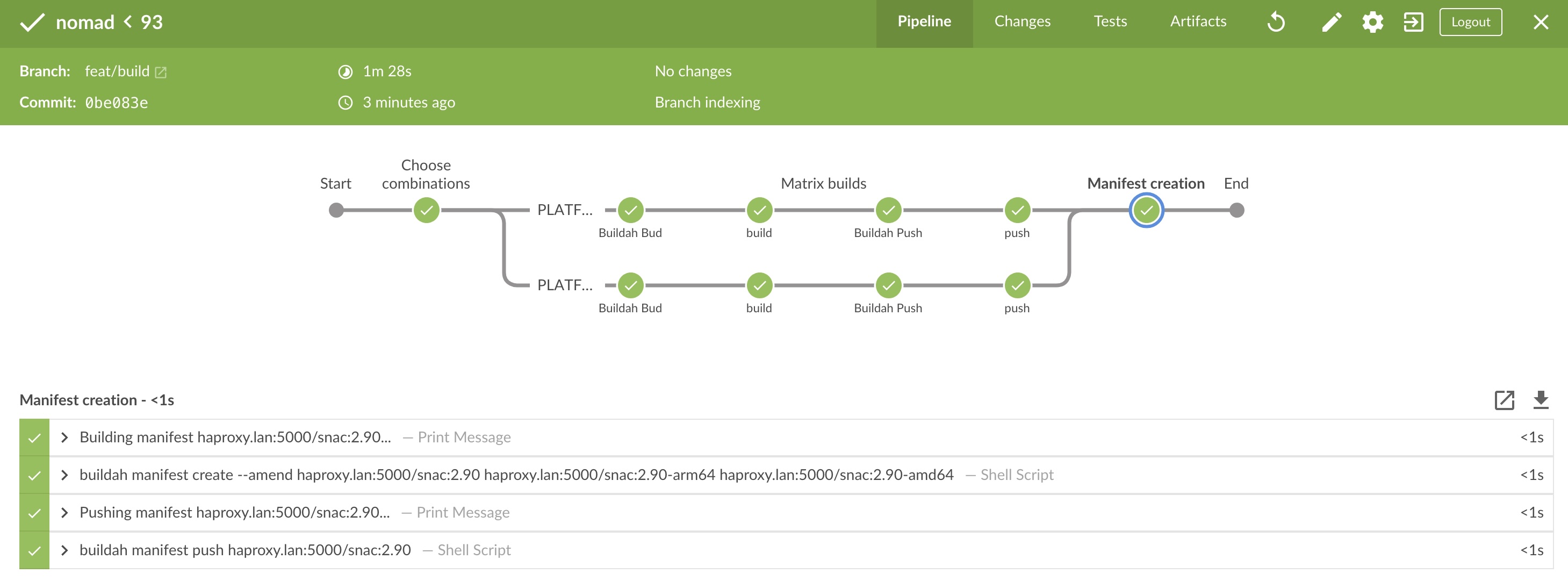
It doesn't matter on which architecture I create the manifest.
I'm still a huge fan of the extensibility of these Jenkins libraries. By simply reusing my existing libraries for Buildah bud (class BuildahBud) / push (class BuildahPush) / manifest creation (class BuildahManifest) from my already working “static” use case, I could extend quickly with the “parallel build” functionality (in a new/separate class which simply imports the existing functionality) 🤗.
Later I might figure out more about @NonCPS and NonCPS best practices.. hit me up if you would like to educate me 🤔
Thanks for reading